How to Cancel Your OurDream AI Subscription(unsubscribe)
How to cancel your OurDream AI subscription step by step, no support needed: Profile → Subscription → Cancel. What you lose after, and how to reactivate. Screenshots 2026.
- It's all done from your account — no need to contact support
- Profile → Subscription → Cancel Subscription, then 2 confirmations
- You keep access until the end of the period you've already paid for
- After that: your images and videos go back to blurred, unlimited chat stops. You can reactivate anytime (Resume Subscription)
For pricing + DreamCoins details, see our OurDream review.
Good news: on OurDream, canceling is fast and trap-free. No hotline, no endless form — it all happens from your profile, in a few clicks. I’ll show you the exact path, screenshot by screenshot, and above all what happens afterward (because that part rarely gets spelled out before you click).
How do you cancel your OurDream AI subscription?
To cancel your OurDream subscription: log in, click Profile (left menu), open Subscription, then Cancel Subscription. Confirm in both windows (Cancel then Confirm Cancellation). Your status switches to “Cancelling” and you keep access until the end of the paid period. No support needed.
The step-by-step is below.
Before you start
- Cancellation is 100% online, from your OurDream account (web).
- You keep your Premium access until the next payment date (no immediate cutoff).
- DreamCoins already spent aren’t refunded — this is a cancellation, not a refund.
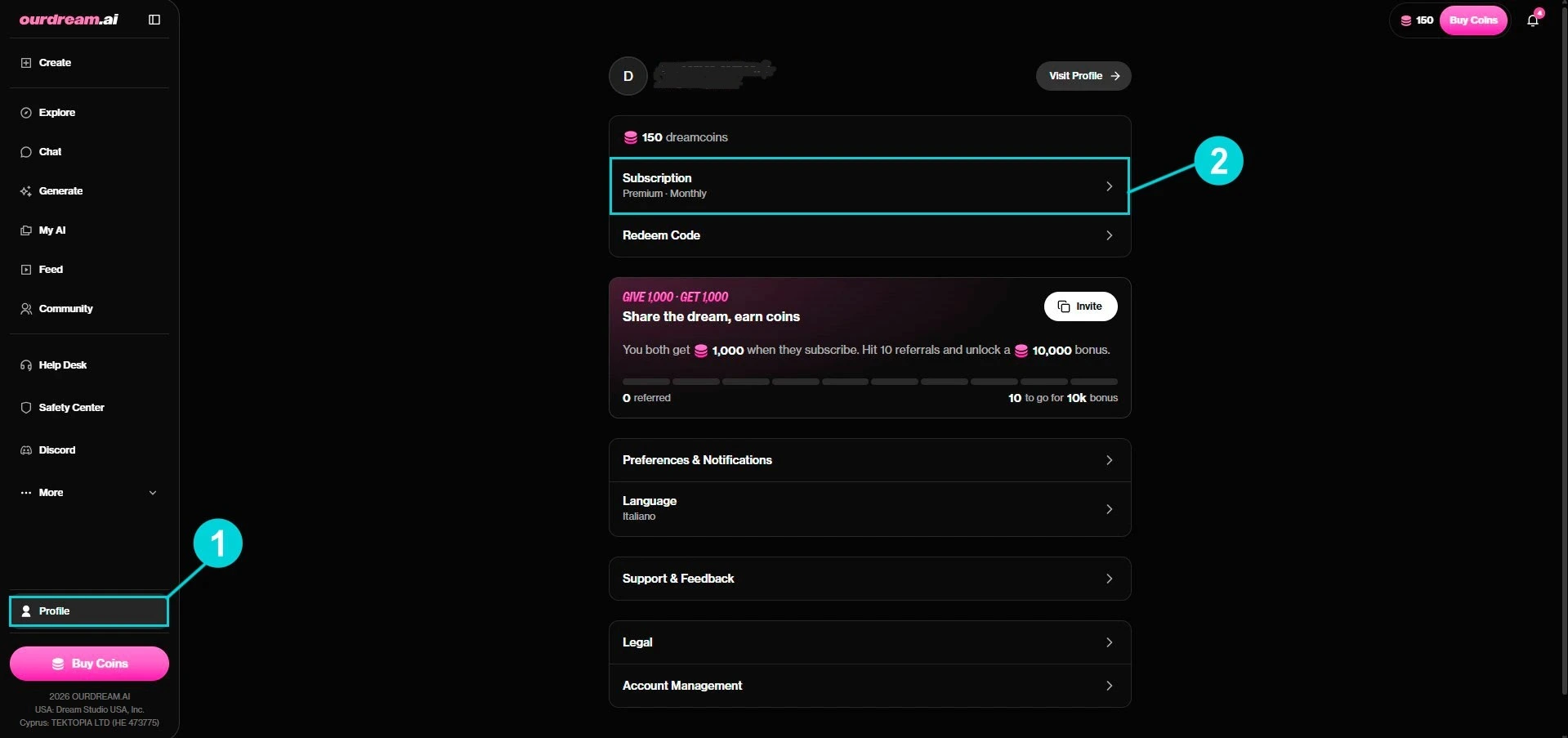
Step 1 — Open your profile and subscription
Click Profile at the very bottom of the left menu. On the profile page, find the Subscription card (it shows your plan, e.g. “Premium · Monthly”) and click it.
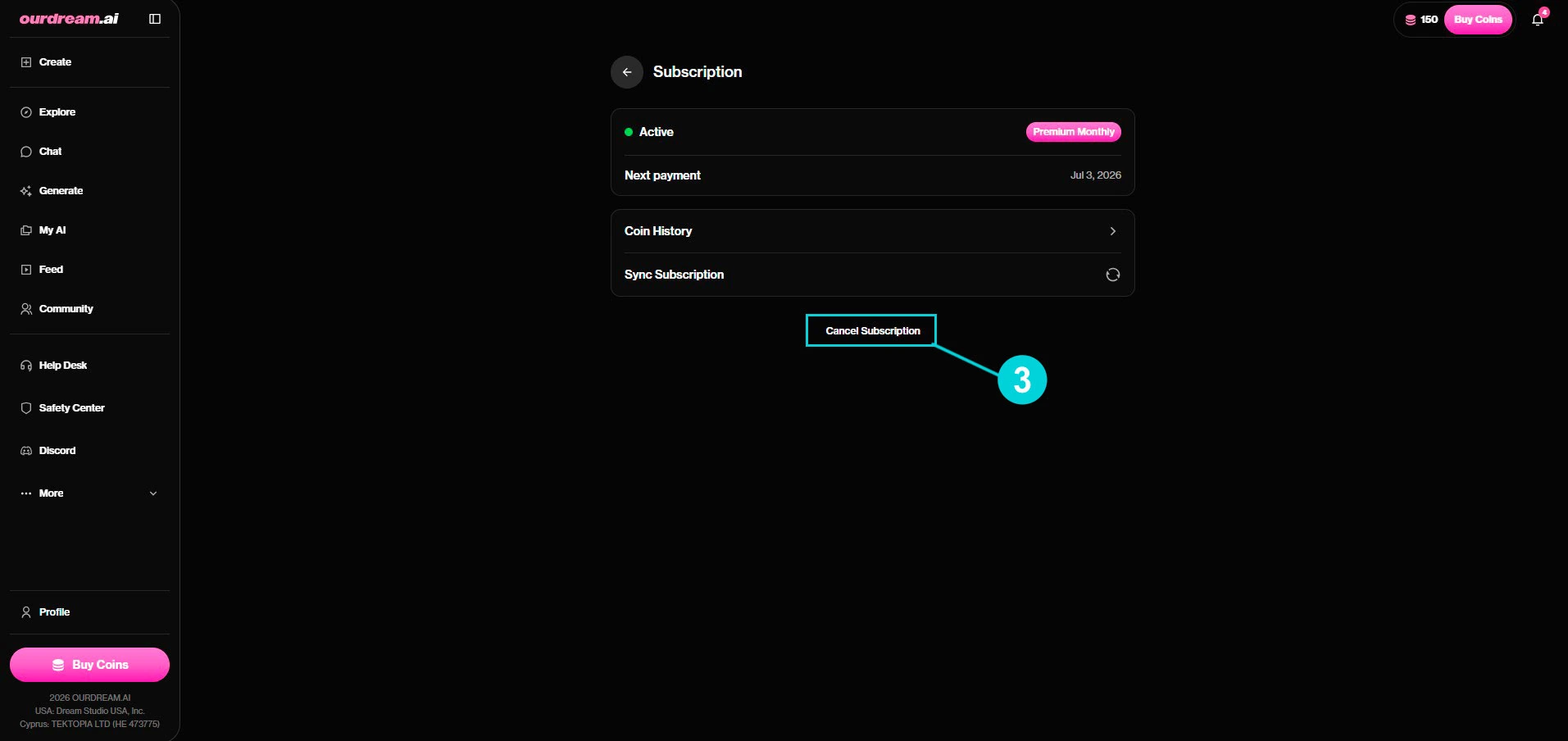
Step 2 — Click Cancel Subscription
You land on the Subscription page: status Active, next payment date, coin history. At the bottom, click Cancel Subscription.
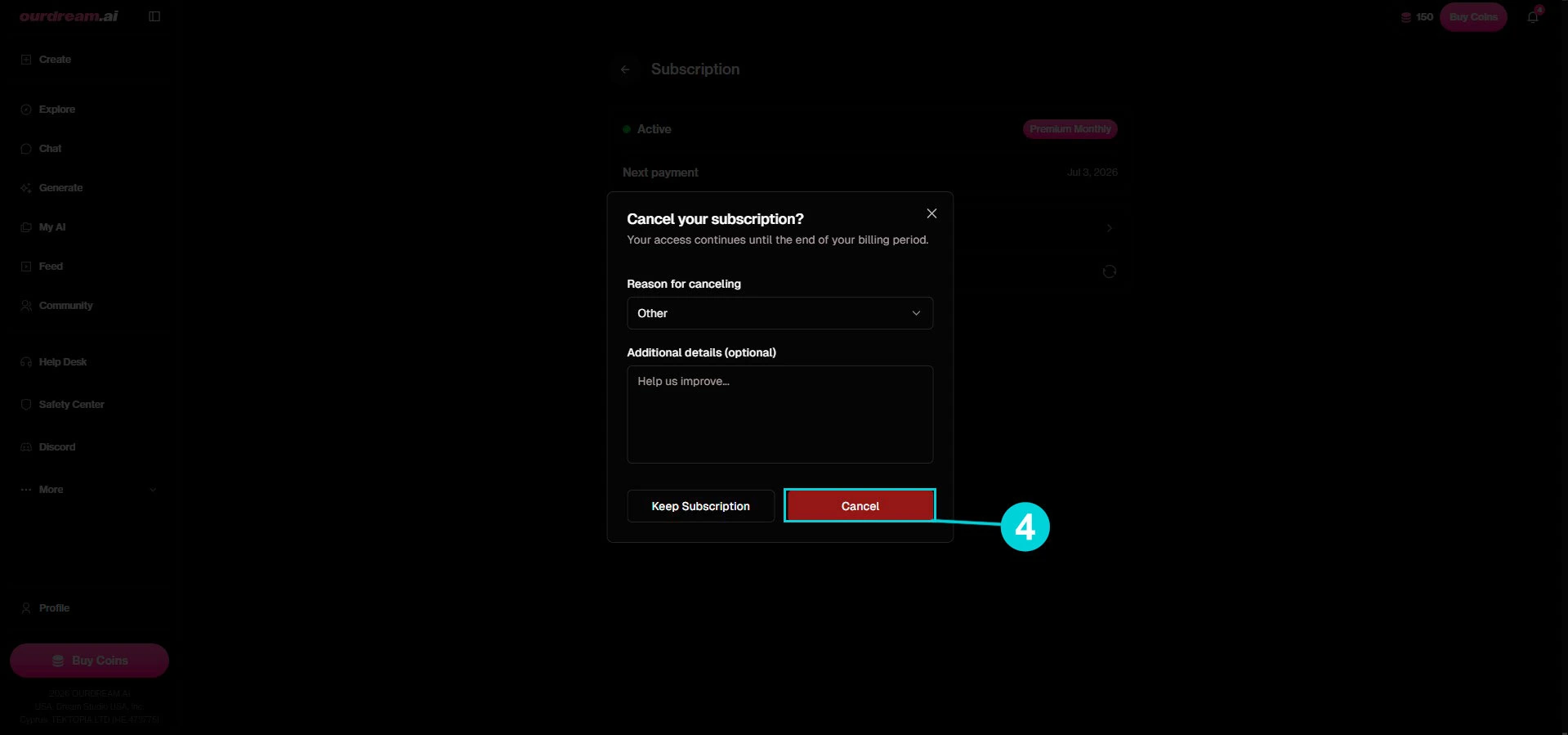
Step 3 — First confirmation
A “Cancel your subscription?” window opens. It reminds you that your access continues until the end of the period. Pick a reason (optional) then click Cancel (the red button). If you’re hesitating, Keep Subscription backs out.
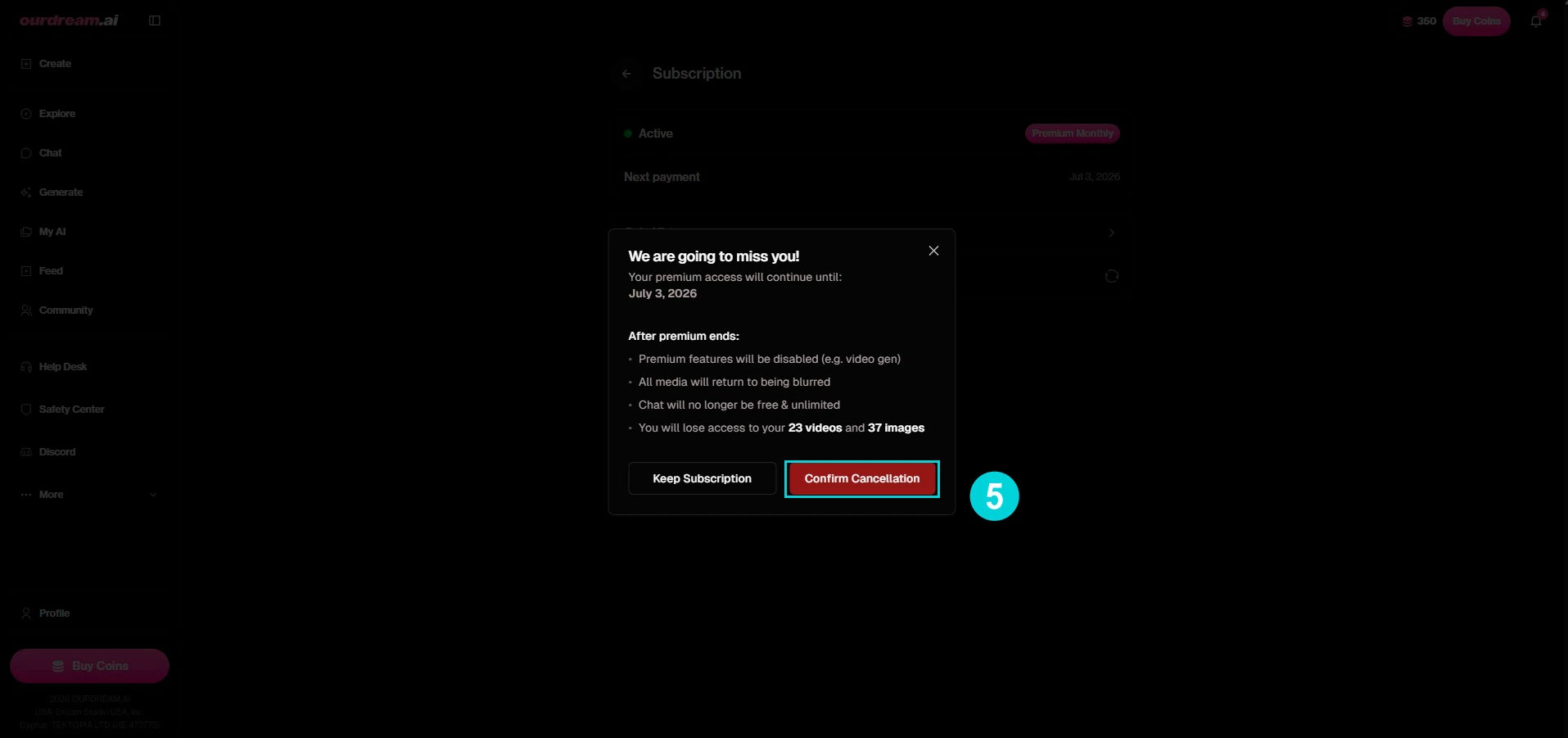
Step 4 — Second confirmation (what you lose)
OurDream shows one last honest recap, “We are going to miss you!”: your Premium access continues until the date shown, then premium features are disabled (video gen), your media goes back to blurred, chat is no longer unlimited, and you lose access to your generated videos and images. Click Confirm Cancellation to validate.
Step 5 — It’s canceled
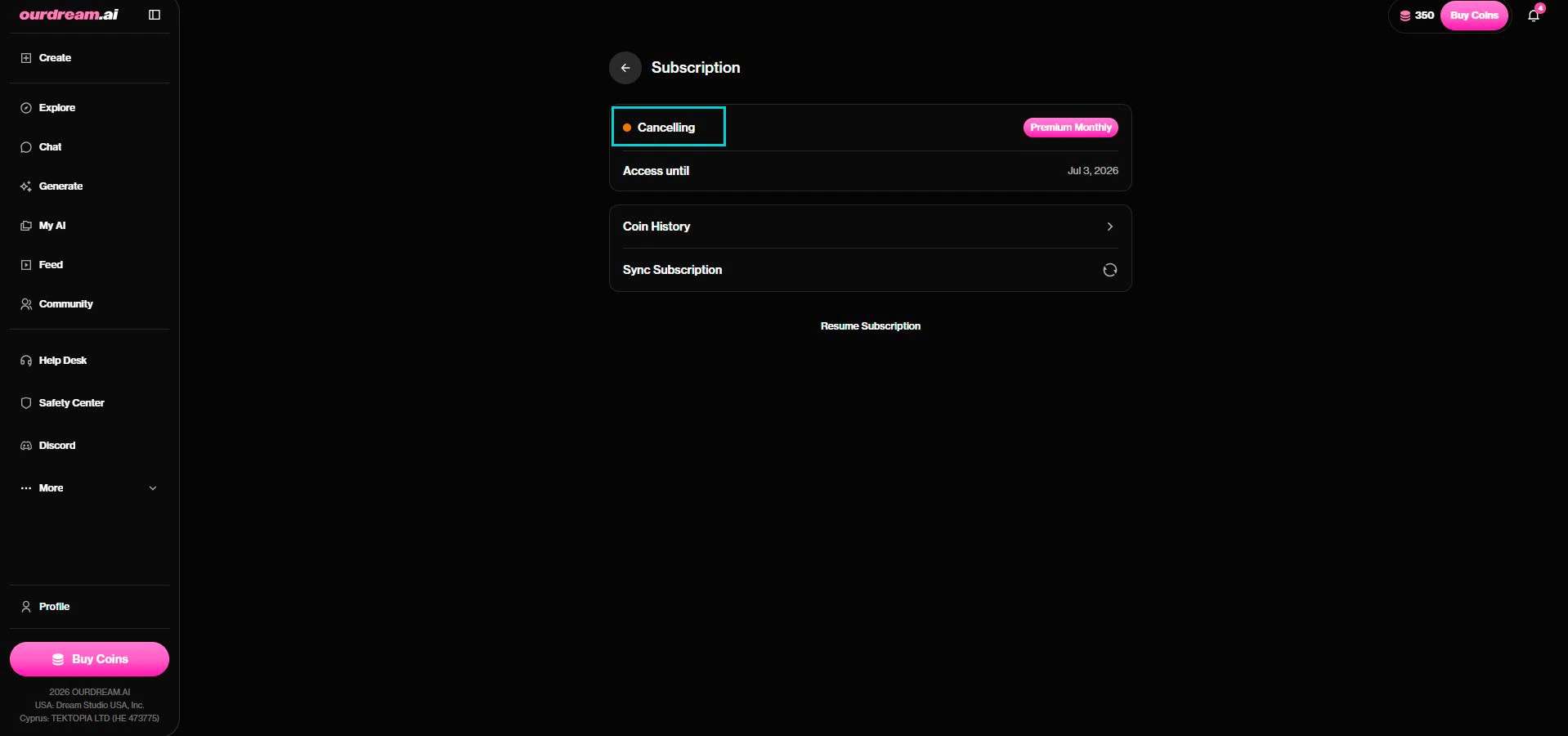
Back on the Subscription page, the status switches to “Cancelling” with the “Access until” date. That’s it: you won’t be charged again. A Resume Subscription link appears if you change your mind before the period ends.
What happens after cancellation
At the end of your paid period:
- Premium features are cut off (video generation, etc.).
- Your generated images and videos go back to blurred — you can’t access them until you resubscribe.
- Chat is no longer unlimited.
- Your account stays active (your characters aren’t deleted) — only Premium stops.
Tip: if you just want a budget break, you can cancel now and enjoy access until the end date you’ve already paid for — then resubscribe later. Your characters will be waiting.
Frequently asked questions
Do I get a refund when I cancel?
No. Canceling stops the renewal, but the current (already paid) period isn’t refunded — you enjoy it to the end. DreamCoins already spent aren’t refundable either.
Do I really lose my videos and images?
They’re not deleted, but they go back to blurred once Premium ends: you can’t access them until you resubscribe. If you want to keep them, download them before your period ends.
Can I undo it?
Yes. While you’re in the “Cancelling” period, a Resume Subscription button lets you reactivate. After it ends, you can resubscribe normally — your account and characters are kept.
How do I fully delete my account?
Canceling the subscription ≠ deleting the account. Permanent deletion is handled separately under Account Management on your profile page (irreversible). Canceling keeps your account and characters.
Go further
— Our full OurDream AI review — pricing, DreamCoins, what Premium is worth
— How to make a long video with OurDream — before you go, have you tried Extend Video?
— Best AI Girlfriends 2026 comparison — if you’re looking for an alternative
→ Our full OurDream AI review
→ All our tutorials
→ Best AI Girlfriends 2026 comparison