How to Cancel Promptchan(end your Pro subscription)
Cancel Promptchan AI step by step: the Cancel button in your settings isn't enough — you finish on Centrobill. The exact path, screenshot by screenshot, and what you keep after. 2026.
- The catch — the Cancel button in your Promptchan settings doesn't actually stop the subscription: it bounces you over to Centrobill (the payment processor), and that's where it really ends
- Step 1 (Promptchan) — avatar → Settings → Account section → Cancel → confirm the pop-up
- Step 2 (Centrobill) — you get a link sent to your Promptchan account email; in the email, click the link under the SIGN IN button (not the button) → your promptchan.com subscription → Cancel membership → Confirm
- You keep access until the renewal date you already paid for. Your Gems stay as long as the account is active
For pricing + Gems details, see our Promptchan review.
Quick heads-up before you start clicking around: cancelling Promptchan isn’t as direct as elsewhere. You hit Cancel in your settings, you think you’re done… and you’re not. The button sends you over to Centrobill, the processor that handles the payment, and that’s where you actually stop the renewal. Stop before that and you’ll get charged again. I’ll walk you through both steps, screenshot by screenshot.
How do I cancel Promptchan?
Cancelling Promptchan happens in two parts: inside Promptchan (avatar → Settings → Account → Cancel → confirm the pop-up), then on Centrobill, where you get redirected. There you receive a sign-in link on your Promptchan account email, open your promptchan.com subscription → Cancel membership → Confirm. You keep Pro access until the renewal date you already paid for.
The step-by-step is below.
Before you start
- Keep access to your inbox — the one for your Promptchan account (that’s the email Centrobill asks for, even though it never says so). You’ll get a one-time sign-in link there.
- You keep Pro access until the renewal date shown — no immediate cutoff.
- No refund: this is a cancellation, not a refund. You enjoy the current period to the end.
- By cancelling you also lose your “exclusive discount”: if you resubscribe later, it’ll be at full price.
Part 1 — Inside Promptchan
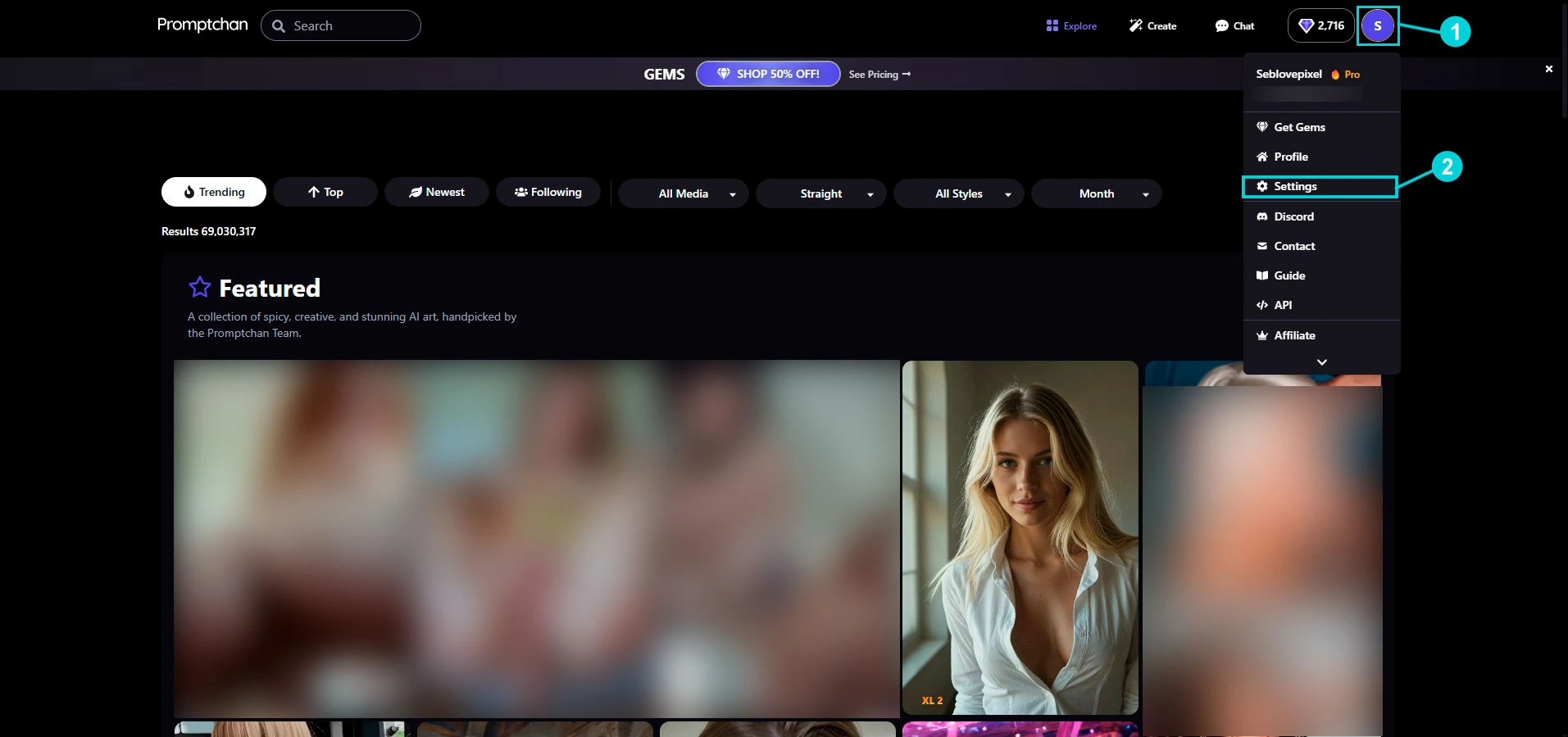
Step 1 — Open Settings
Top right, click your avatar (1), then Settings (2) in the menu.
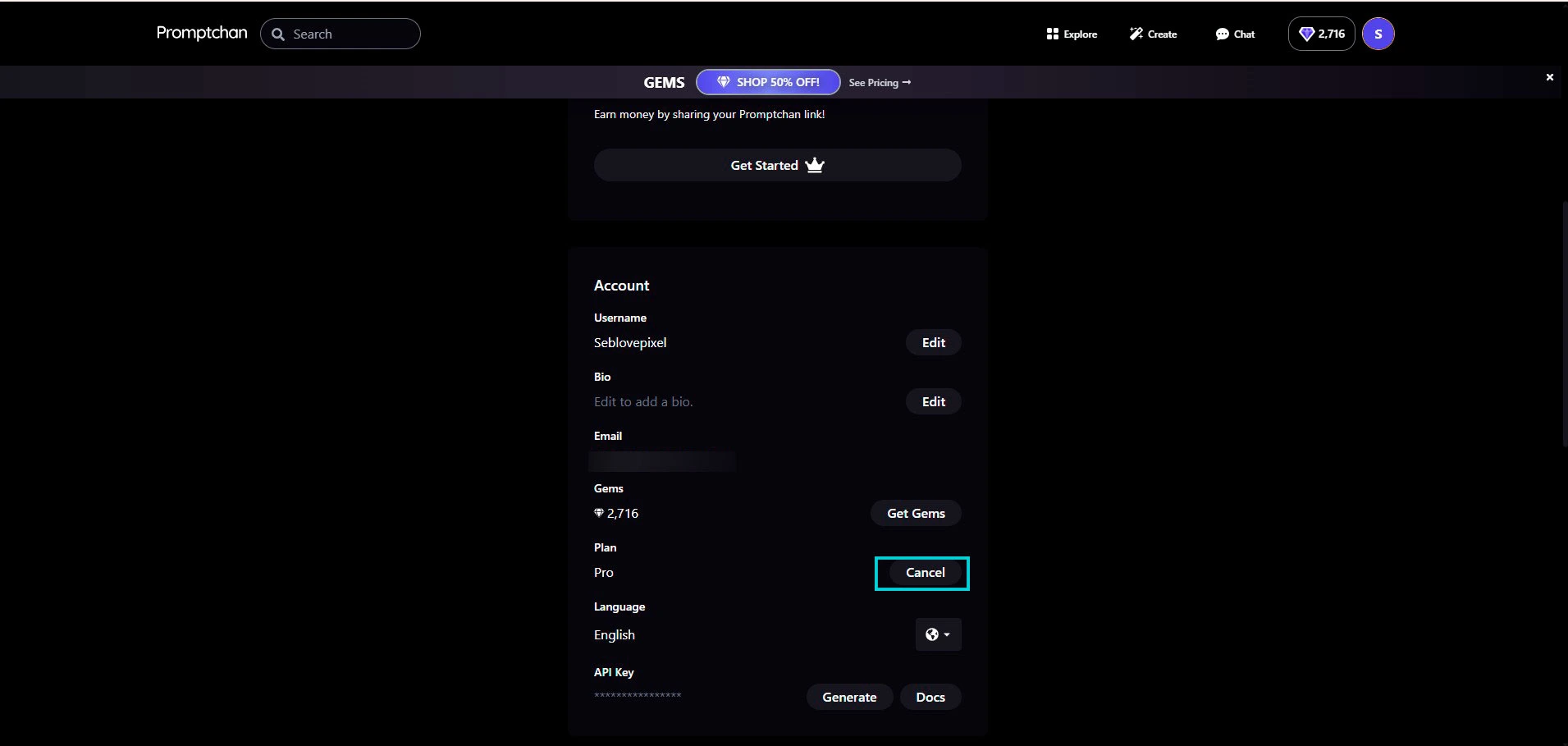
Step 2 — Account section → Cancel
Scroll down to the Account block. Next to Plan: Pro, click the Cancel button.
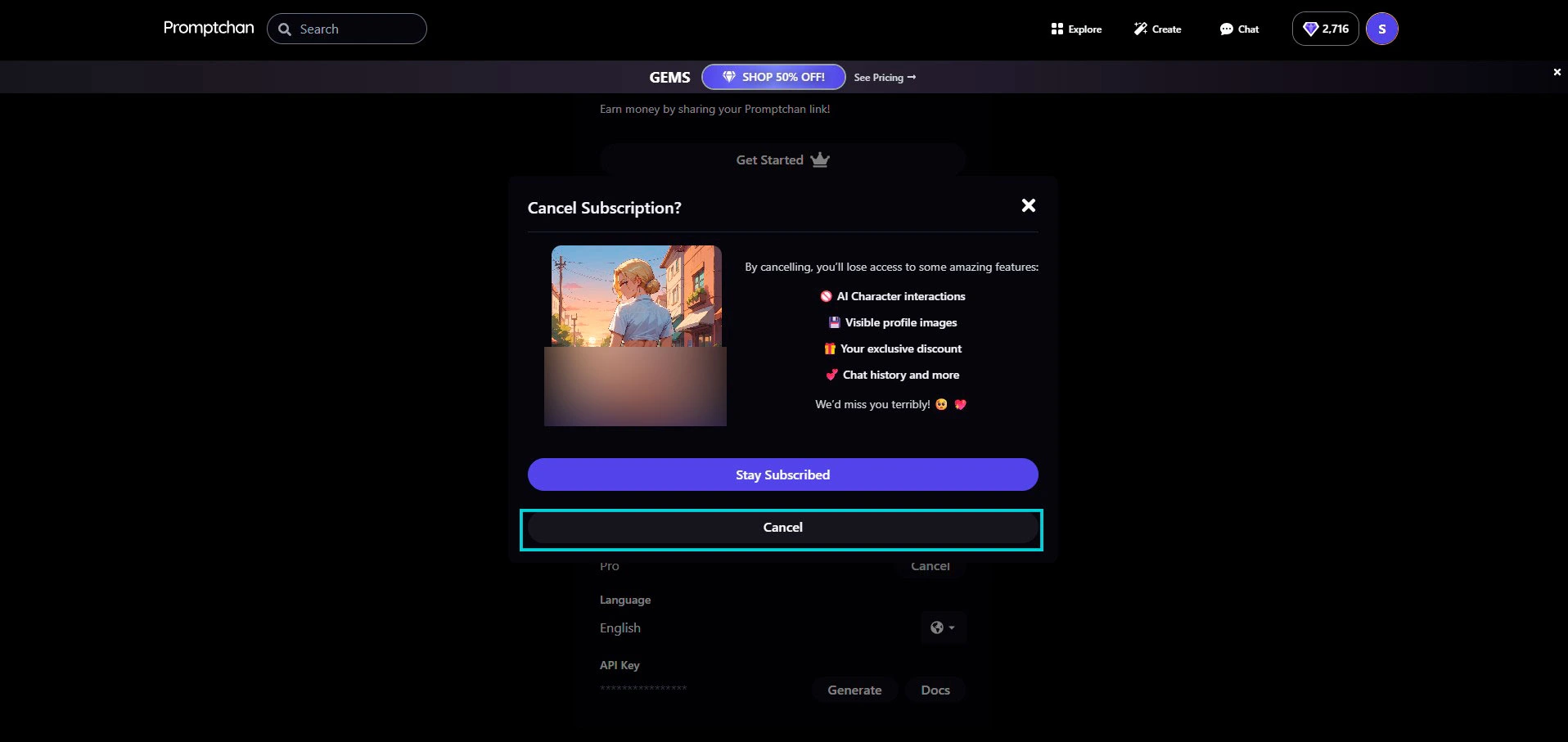
Step 3 — Confirm the pop-up
A “Cancel Subscription?” window opens and reminds you what you lose: AI character interactions, visible profile images, your exclusive discount, chat history… Ignore Stay Subscribed and click Cancel (the bottom button).
Part 2 — On Centrobill (the step nobody tells you about)
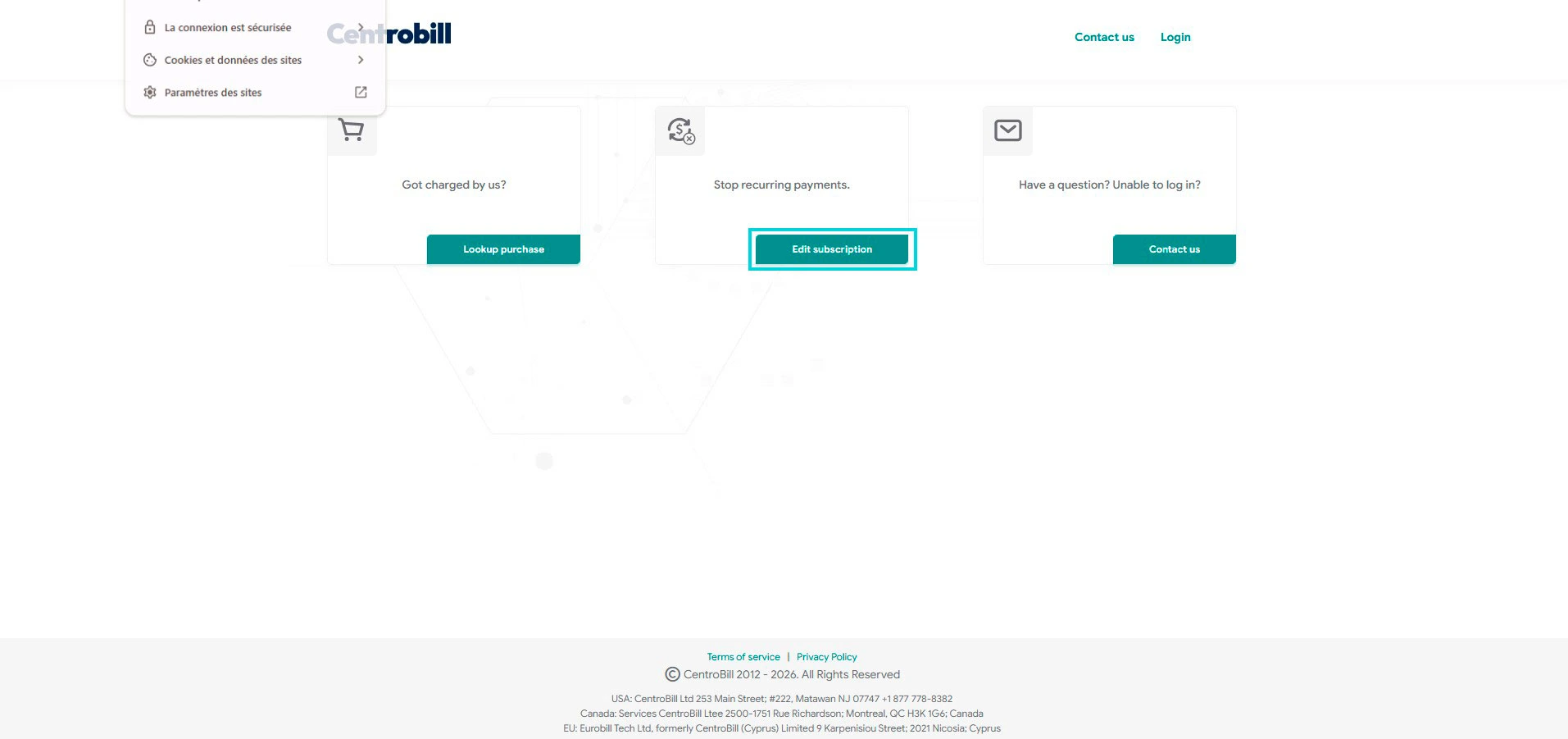
Step 4 — You get redirected to Centrobill
Promptchan sends you to the Centrobill page. Under “Stop recurring payments”, click Edit subscription.
Step 5 — Request the sign-in link by email
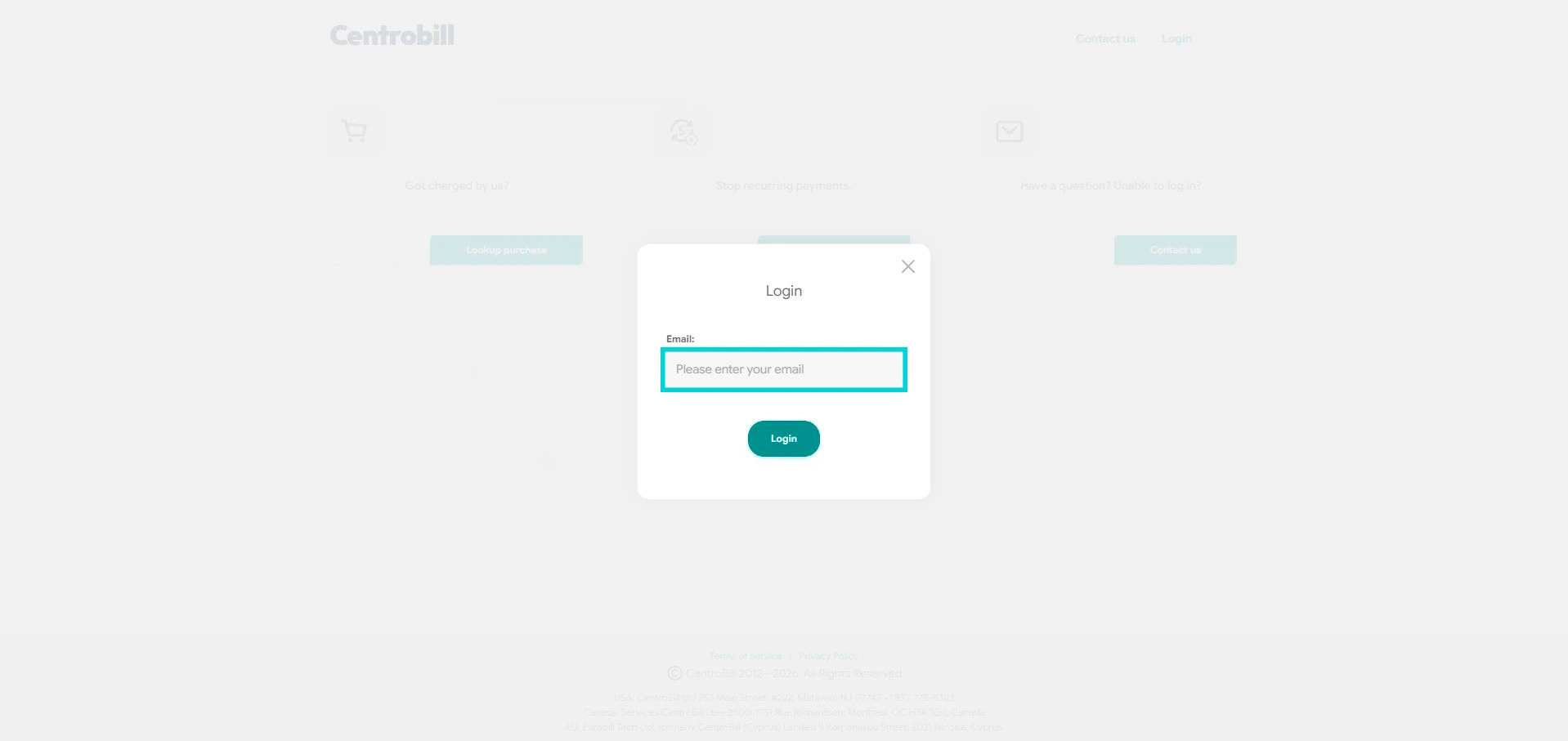
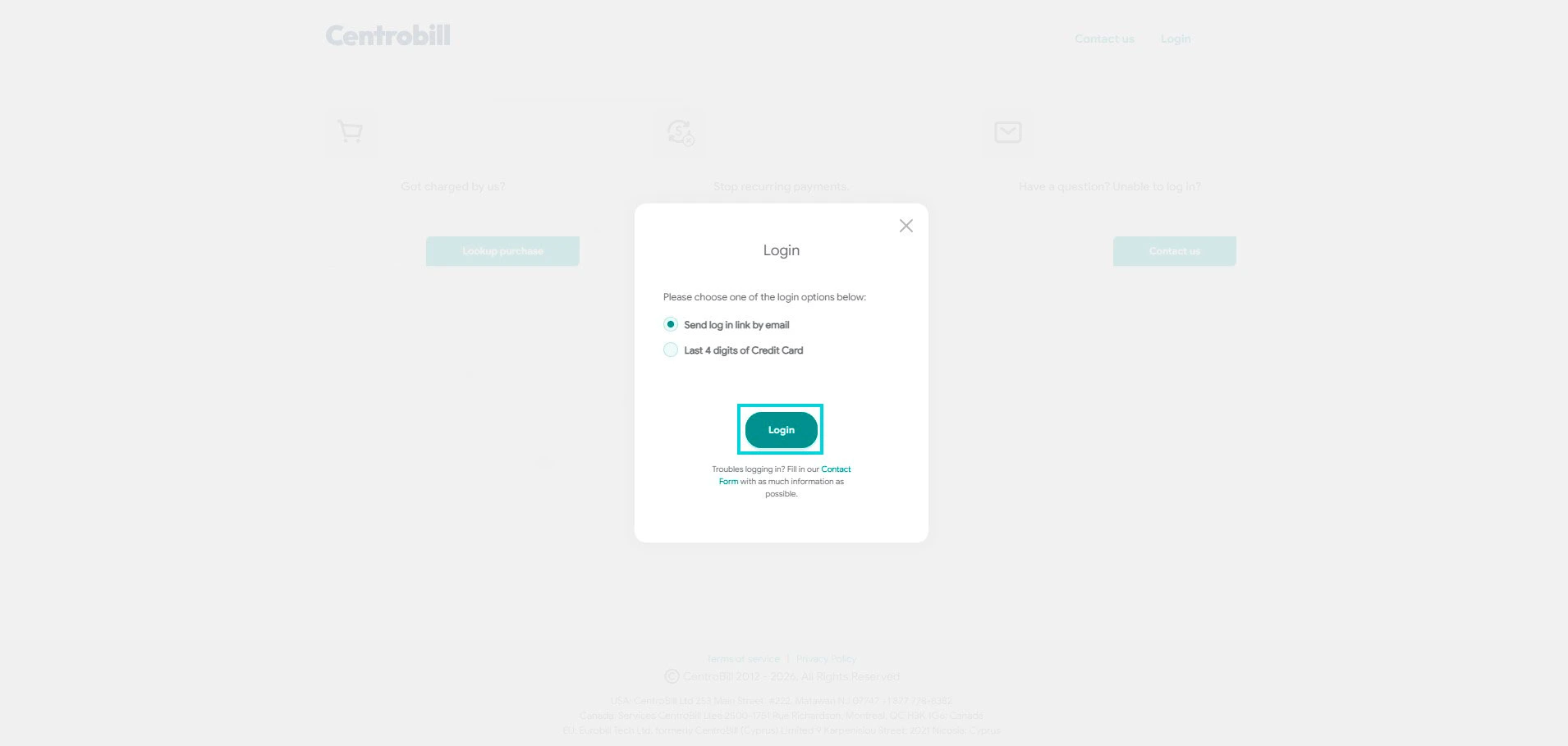
Centrobill asks for an email: it’s the one for your Promptchan account (the screen doesn’t say so, but that’s the one it wants). Enter it, keep the “Send log in link by email” option, then click Login. (If you no longer have access to that inbox, the “Last 4 digits of Credit Card” option works too.)
Step 6 — Open the email and click the RIGHT link
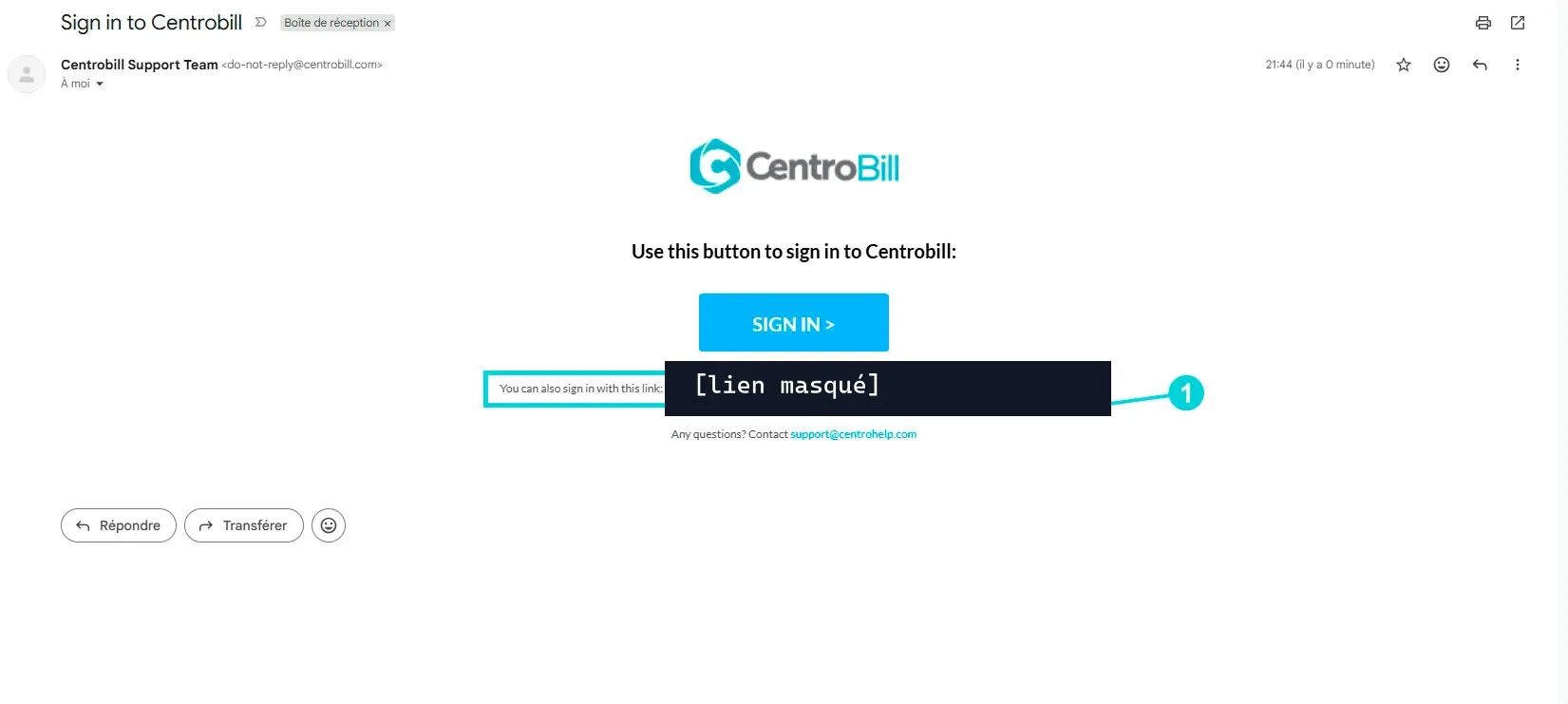
Go to your inbox: you’ll get a “Sign in to Centrobill” message. Watch out — don’t click the big SIGN IN button. Click the link just below it (“You can also sign in with this link…”), the one circled in the screenshot. That’s what actually opens your subscription page.
Step 7 — Open your subscription
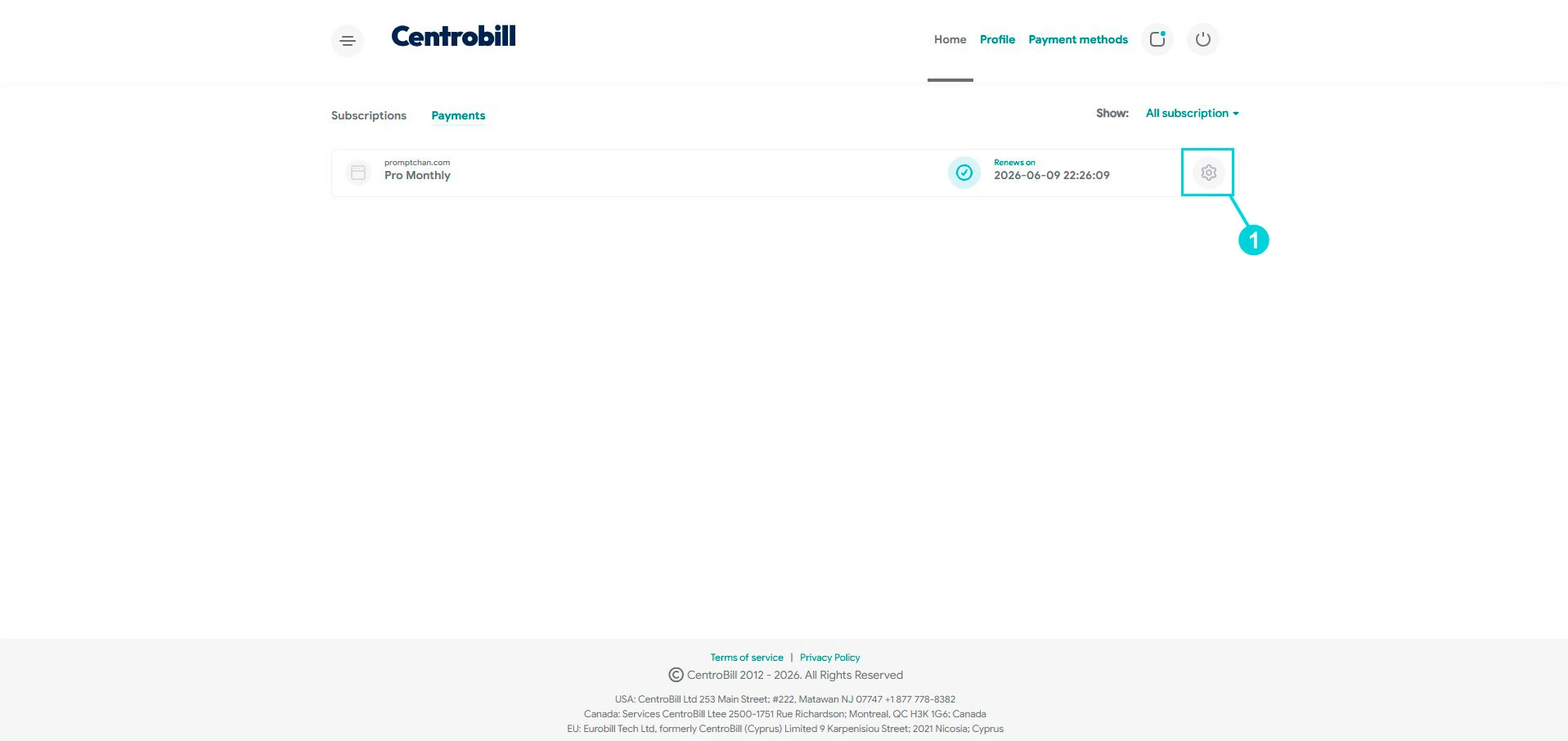
In your Centrobill area, Payments tab, you’ll see your promptchan.com — Pro Monthly line with the “Renews on” date. Click the gear icon on the right.
Step 8 — Cancel membership
On the subscription card, click Cancel membership (to the left of Report a problem).
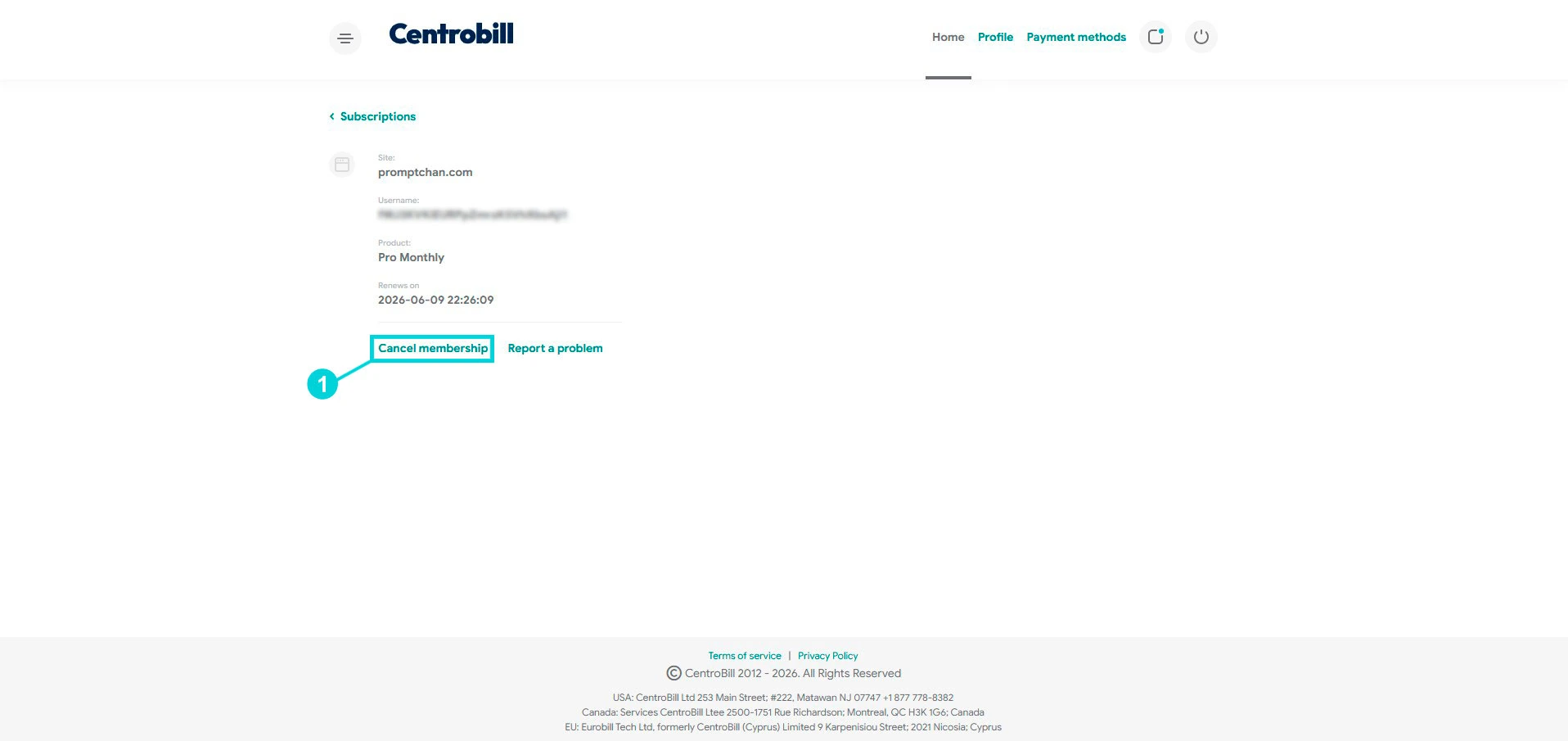
Step 9 — Confirm
A final window warns that all further charges will be stopped. Both dropdowns (reason for leaving / what would make you stay) are optional — you can leave them as is. Click Confirm.
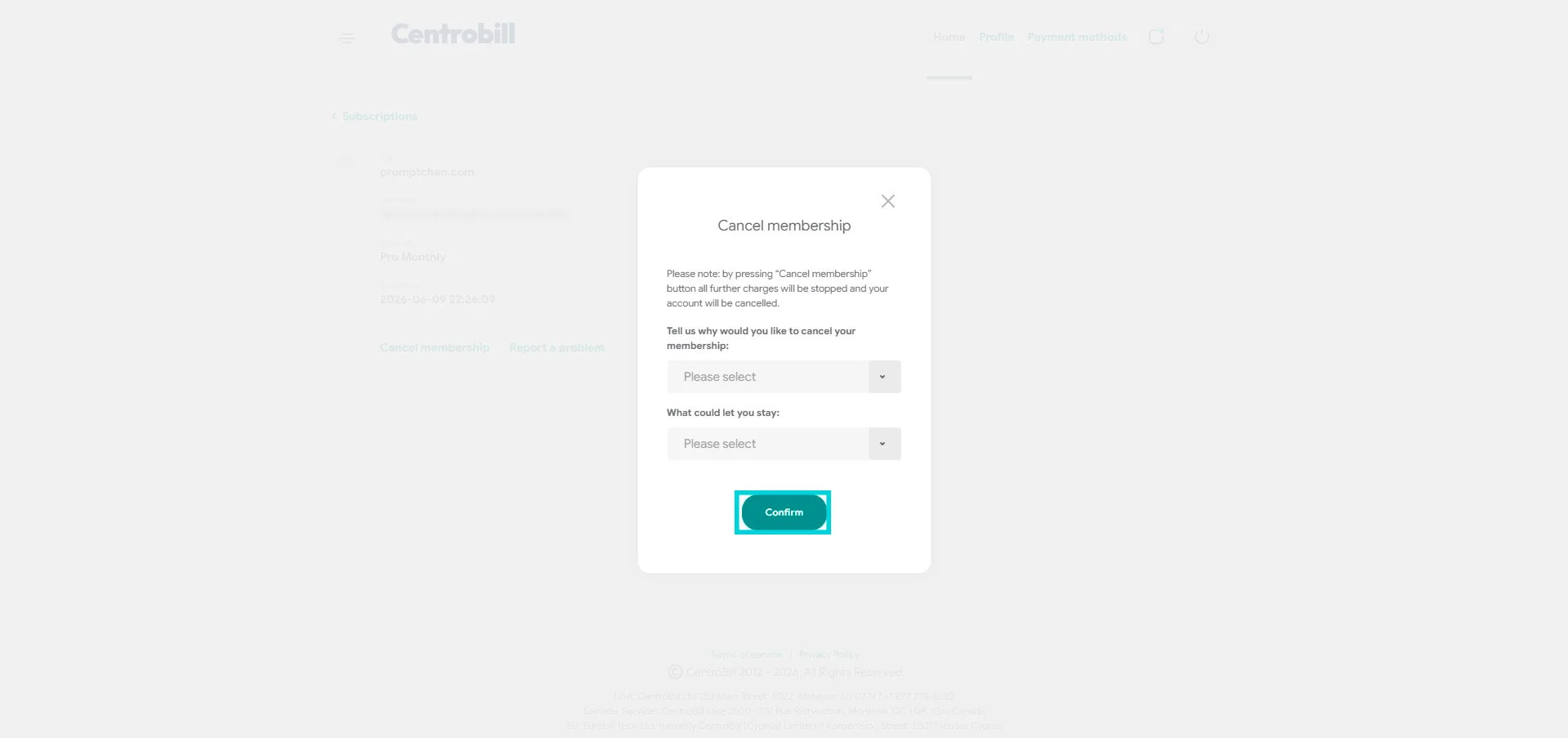
Step 10 — It’s cancelled
Done. The card switches to “Expired on” and, on the Payments tab, your line shows “Automatically canceled on” with the date. You won’t be charged again — and you keep access until that date.
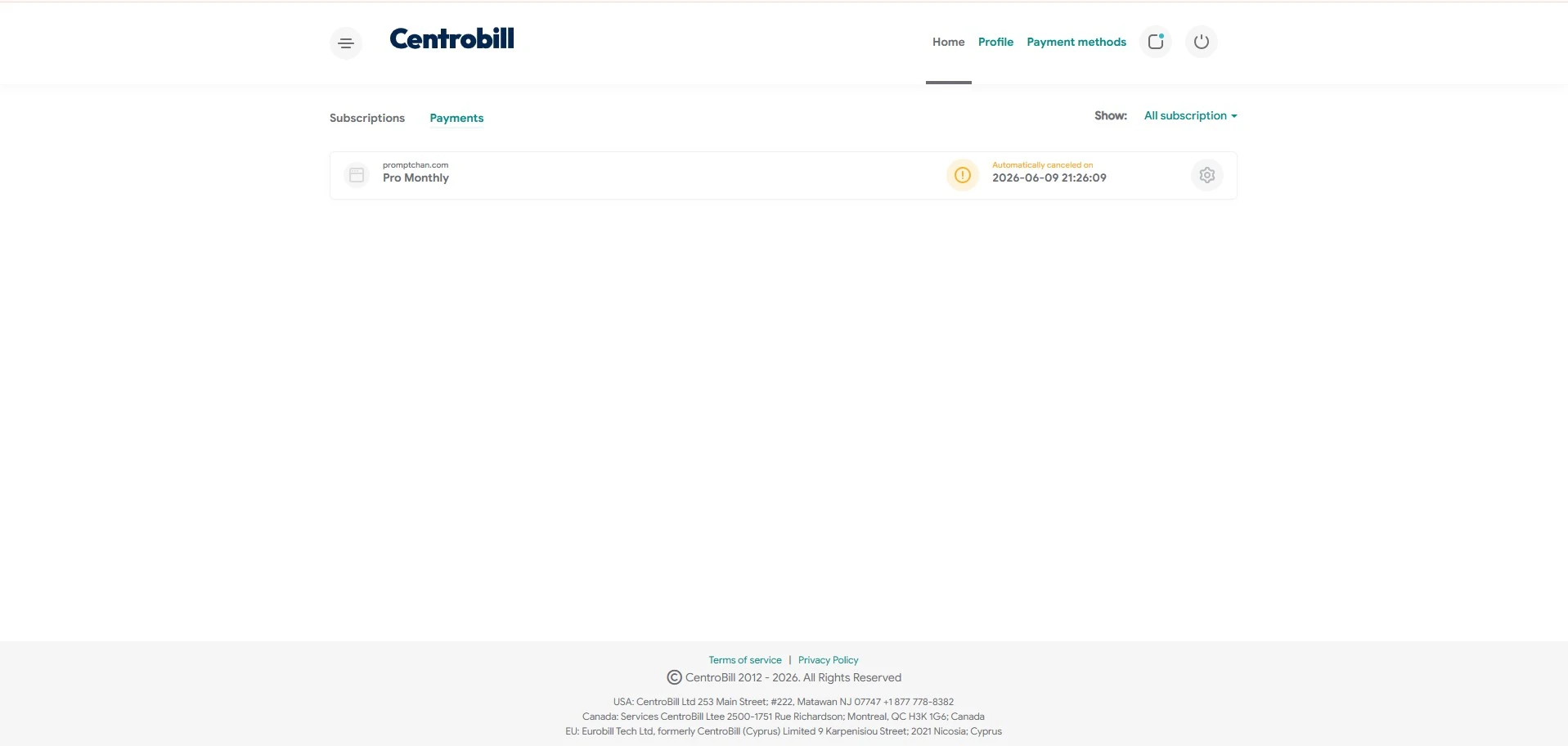
To check later: you can click the link from the email again anytime — you’ll land straight back on this window confirming “Automatically canceled on”. Handy to make sure it’s really stopped.
What happens after cancelling
At the end of your paid period:
- Pro stops: you go back to the free plan (safe mode, NSFW hidden, limited generations).
- The Gems you already bought stay in your account as long as it’s active — no immediate loss.
- Your account and creations aren’t deleted — only the subscription stops.
- You lose the promo price: a future resubscribe will be at full price.
Tip: you can cancel right now and enjoy Pro access until the renewal date you already paid for. No point waiting for the last day — cancel now so you don’t forget.
Frequently asked questions
Is the "Cancel" button in Promptchan enough?
No, and that’s the trap. In Promptchan’s settings, Cancel redirects you to Centrobill — it doesn’t stop the renewal on its own. Until you’ve done Cancel membership → Confirm on Centrobill, the subscription can keep charging you.
I no longer have access to my signup email?
When signing in to Centrobill, pick the “Last 4 digits of Credit Card” option instead of the email link. If that fails, use Centrobill’s Contact us link to ask them to stop the charge.
Do I get a refund when I cancel?
No. Cancelling stops the renewal, but the current (already paid) period isn’t refunded — you enjoy it to the end. Gems already spent aren’t refundable either.
Do I keep my Gems?
Yes, the Gems you bought stay in your account as long as it’s active. It’s Pro access (unlimited generations, NSFW unlocked, etc.) that stops at the end of the period.
How do I delete my account entirely?
Cancelling the subscription ≠ deleting the account. Cancelling stops the payment and keeps you on the free plan. To permanently delete the account, go through Promptchan support (Contact in the menu) — that’s a separate, irreversible action.
Going further
— What the Pro is really worth — pricing, Gems, verdict — My eHentai.ai review — instant hentai fun, more accessible — Best AI Girlfriends 2026 comparison — if you’re looking for an alternative
→ Promptchan: review & test → All our tutorials → Best AI Girlfriends 2026 comparison